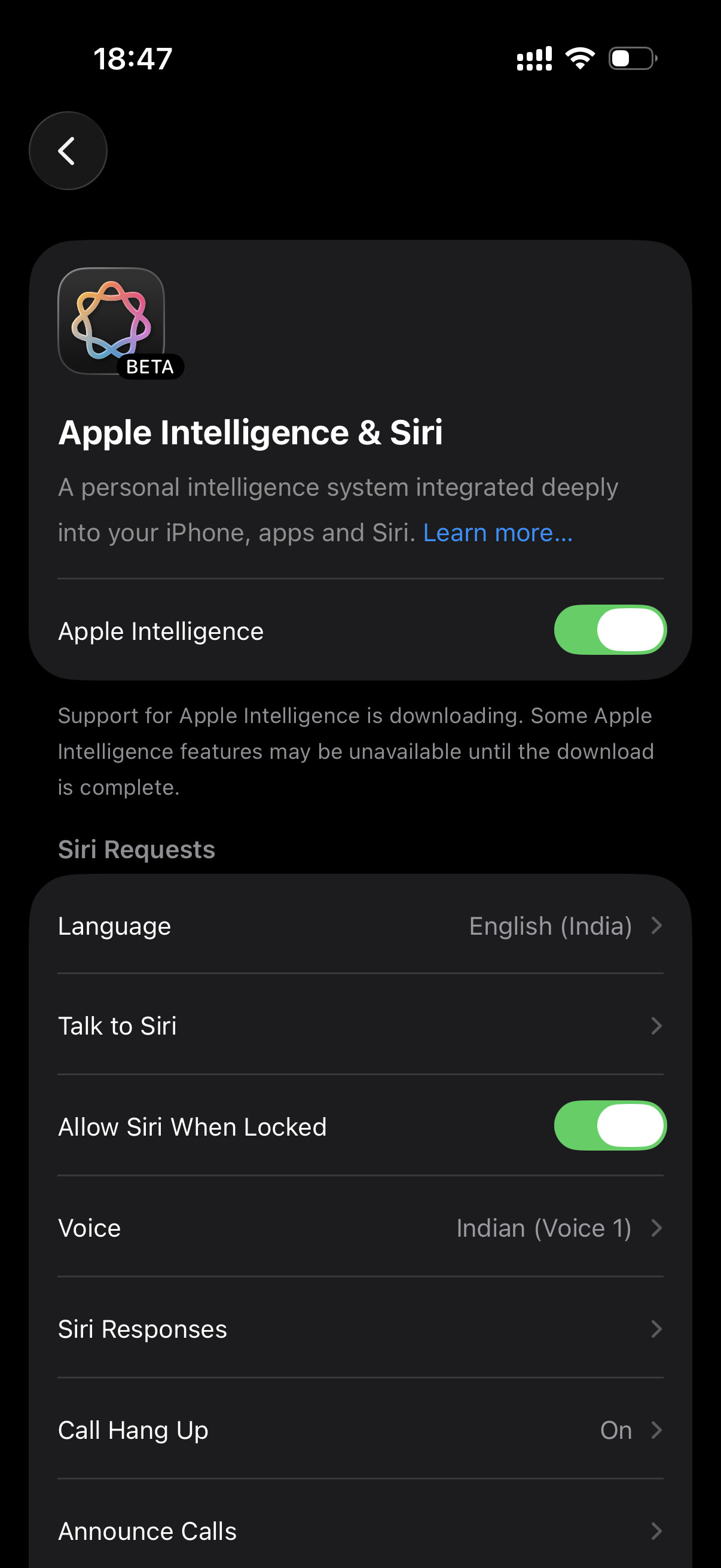
Hi brother I’m recently upgraded iPhone 13 to iPhone 17 transfer paniten but after few days la system storage 29gb occupied unga video steps pathu paniten but 1 or 2 gb reduce agudhu still I’m facing this issue any solution for this brother .
And Apple Intelligence delete panitu again enable paniten but 2 days ah still downloading nu show agudhu
Hi bro, yes. icloud backup pannitu restore pannalaam. then icloud backup restore pannalaamnga. ithunaala system storage oralavuku reduce aagumnga. but romba difference irukathunga. system storage normal usage appo again 20GB around vanthudumnga.
ippo storage full nu ethavathu warning irukungala?
No bro normal ah iruku but storage occupied aagudhu
Apple Intelligence download panitu delete paniten bro again download panalam nu try pandren not working bro still showing downloading nu varadhu 2-3 days agudhu
battery also draining quickly bro mobile buy panni 15 days aagudhu previous ah iPhone 13 use panitu irunden battery health 78% irundha dhu bro . now iPhone 17 100% la use pandren no difference bro day ku twice charge pandren.
phone wifi la connected a irukumbothum and charging la irunthuchuna background la apple intelligence files download aagidumnga. try it today. once phone restart pannidunga then follow above steps.
first 2 or 3 weeks namma usage pattern learn pannitu optimisation aagumnga. so initially we see battery drain in a day under normal usage. only if the usage is heavy screen time is high on some days we will have to charge twice. other times it will maintain bro.
Bro try paniten same issue restart panitu the. WiFi la connect panni charger connect pannitu Apple Intelligence on paniten 1 hour 30 minutes wait pani pathen still showing same bro like downloading….
Etho bug affect pannuthunga once perform settings - general - reset - reset all settings bro. Then enable apple intelligence. iOS 26.5.2 la irukeenga correct?
no need bro. just background app refresh mattum on la vainga. system service automatic a run aagumnga. lets wait till today evening and see if apple intelligence setup completed or not.
WiFi router la thaana connect pannirukeenga? or another mobile hotspot?
Ok bro. thats good. just wifi la connect pannitu vidunga. evening around 6 or 7 PM check pannitu sollunga. also share current apple intelligence page screenshot here bro.
Today I updated ios 26.6 brother after update mobile usage was smooth and good system storage also reduced by 13Gb but Apple Intelligence bug was not fixed facing the same issue
We have tried all the basic troubleshooting steps, bro the last one is taking a back up and then performing iOS restore using a computer.
but before that as you have updated to iOS 26.6 just give one more day time and leave the Apple Intelligence file and not downloaded automatically when the phone is connected to Wi-Fi.
Then we can try the iOS restore method using a computer.